PPT

Help Video

How to Find UBT Basics on the LMP Website

Learn how to use the LMP website:

LMP Website Overview

Learn how to use the LMP website:

How to Find How-To Guides

This short animated video explains how to find and use our powerful how-to guides

Learn how to use the LMP website:

How to Find and Use Team-Tested Practices

Does your team want to improve service? Or clinical quality? If you don't know where to start, check out the team-tested practices on the LMP website. This short video shows you how. 

Learn how to use the LMP website:

How to Use the Search Function on the LMP Website

Having trouble using the search function? Check out this short video to help you search like a pro!

Learn how to use the LMP website:

How to Find the Tools on the LMP Website

Need to find a checklist, template or puzzle? Don't know where to start? Check out this short video to find the tools you need on the LMP website with just a few clicks. 

Learn how to use the LMP website:

TOOLS

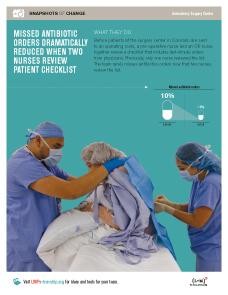
PowerPoint: Errors Drop With Pre-Op Double up

Format:
PPT

Size:
1 slide

Intended audience:
LMP staff, UBT consultants, improvement advisers

Best used:
This PowerPoint slide highlights a team that reduced missed antibiotic orders by having two nurses check antibiotic orders. Use in presentations to show some of the methods used and the measurable results being achieved by unit-based teams across Kaiser Permanente.
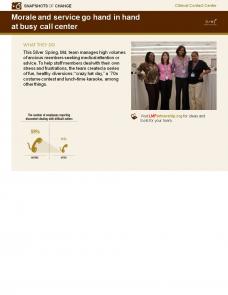
Related tools:

TOOLS

PowerPoint: Sleep Clinic Finds Cause of Repeat Studies

Format:
PPT

Size:
1 Slide

Intended audience:
LMP staff, UBT consultants, improvement advisers

Best used:
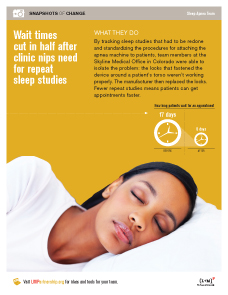
This slide spotlights a team that cut wait times in half by nipping the need for repeat studies. Use in presentations to show some of the methods used and the measurable results being achieved by unit-based teams across Kaiser Permanente.
Related tools:

TOOLS

PowerPoint: Cross-Training Ends Scanning Backlogs

Format:
PPT

Size:
1 Slide

Intended audience:
Frontline employees, managers and physicians

Best used:
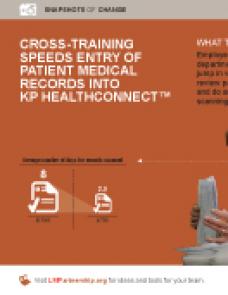
This slide spotlights a team that found a way to speed up the entry of medical records into HealthConnect. Use in presentations to show some of the methods used and measurable results being achieved by unit-based teams across Kaiser Permanente.

Related tools:

TOOLS

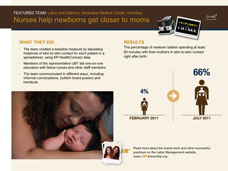
Powerpoint: Nurses Help Newborns Get Closer to Moms

Format:
PPT

Size:
1 slide

Intended audience:
LMP staff, UBT consultants, performance improvement advisers

Best used:
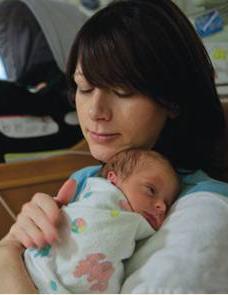
This Powerpoint slide highlights a team that increased the percentage of newborns spending at least 60 minutes with their mothers in skin-to-skin contact right after birth. Use in presentations to show some of the methods used and the measurable results being achieved by unit-based teams across Kaiser Permanente.
Related tools:

TOOLS

Powerpoint: Neonatal Unit's "3 C's" for Outstanding Service

Format:
PPT

Size:
1 Slide

Intended audience:
LMP staff, UBT consultants, improvement advisers

Best used:
This Powerpoint slide spotlights a Neonatal Intesive Care Unit that improved families' understanding and perception of their infant's pain management. Use in presentations to show some of the methods used and the measurable results being achieved by unit-based teams across Kaiser Permanente.
Related tools:

TOOLS

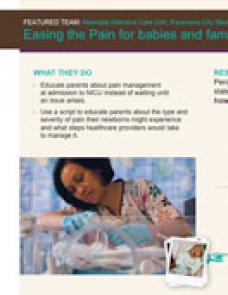
Powerpoint: Easing the Pain for Babies and Families

Format:
PPT

Size:
1 slide

Intended audience:
LMP staff, UBT consultants, improvement advisers

Best used:
This Powerpoint slide spotlights a Neonatal Intesive Care Unit that improved families' understanding and perception of their infant's pain management. Use in presentations to show some of the methods used and the measurable results being achieved by unit-based teams across Kaiser Permanente.
Related tools:

TOOLS

Redwood City UBT Improves Phone Service

Format:
PowerPoint slide

Size:
8.5" x 11"

Intended audience:
Frontline teams, managers, sponsors, physicians

Best used:

This one-page slide shows how the Oncology unit-based team in Redwood City boosted its low phone scores. Save on to your computer to include in meetings or presentations as an example of UBT performance around telephone service.

Related tools:

TOOLS

UBT Fair PPT Template for Team Presentations

Format:
PPT, 11 slides

Intended audience:
Frontline staff, managers, and physicians; regional and facility leadership.

Best used:
Unit-based teams can use this PowerPoint template to share their successful practices at a UBT fair or virtual gathering. This is an alternative to creating a storyboard. The template guides teams to insert key information (such as SMART goals, small tests of change, metrics, and learnings) onto each of the 11 slides for a quick and easy way to create a presentation for a UBT fair or similar event. 

For more tools, please visit the How-To Guide: UBT Fair in a Box.

Related tools:

TOOLS

UBT Fair Storyboard Instructions

Format:
PPT, 10 slides

Size:
8.5" x 11"

Intended audience:
Unit-based teams

Best used:
This presentation helps teams design, construct and display storyboards for a UBT fair.

For more tools, please visit the How-To Guide: UBT Fair in a Box.

Related tools:

Pages

Subscribe to RSS - PPT