Frontline Physicians

Help Video

How to Find UBT Basics on the LMP Website

Learn how to use the LMP website:

LMP Website Overview

Learn how to use the LMP website:

How to Find How-To Guides

This short animated video explains how to find and use our powerful how-to guides

Learn how to use the LMP website:

How to Find and Use Team-Tested Practices

Does your team want to improve service? Or clinical quality? If you don't know where to start, check out the team-tested practices on the LMP website. This short video shows you how. 

Learn how to use the LMP website:

How to Use the Search Function on the LMP Website

Having trouble using the search function? Check out this short video to help you search like a pro!

Learn how to use the LMP website:

How to Find the Tools on the LMP Website

Need to find a checklist, template or puzzle? Don't know where to start? Check out this short video to find the tools you need on the LMP website with just a few clicks. 

Learn how to use the LMP website:

Visit to Nursing Unit Yields Workflow Solution

  • Taking “voice of the customer” training, which advocates direct input from clients to improve a process or service
  • Shadowing nurses to better understand their perspective and identify the root causes of complaints about late or missing medication
  • Starting the morning shift 30 minutes earlier to ensure timely delivery of medications

What can your team do to listen to the voice of your customers? Especially if those customers are fellow employees in a different department? 

Videos

Speaking Up for New Moms

Loading the player...

(2:16)

This labor and delivery team cultivates a #FreeToSpeak culture, which has helped members provide consistently excellent care and service to new moms. 

Take the Easy Way Out

Deck: 
Speed your team on its way with ideas from other teams

Story body part 1: 

Do you or your teammates want to shrink wait times? Save money on supplies? Reduce time wasters or roadblocks? Once you’ve identified a problem to solve, you may wonder where to start. No need to invent an improvement project from scratch. Visit the Team-Tested Practices section and see what’s worked for others. We’ve got short summaries of successes from every region and every type of work environment to give your team a kickstart.

1. What’s here? 

When you visit LMPartnership.org/team-tested-practices, you’ll find the first several “tiles” of the dozens you can choose from as you scroll through this section. Each tile will have a photo and short preview about a specific, measurable improvement a team has made.

2. Sharpen your search 

Want to narrow down what you see? Use the filters on the left side of the page. There are several to try, including:

  • Topic. Choices include affordability, patient safety, service and more.
  • Department. See what departments like yours have done.
  • Region. Check out the projects done in your region.

Selecting more than one filter at a time works, too. And remember that you can get great ideas from departments very different from yours and regions other than your own. You’ll notice these filters throughout the website to help you focus your searches. 

3. Intrigued? 

See something your team might want to try? Click on the tile to get a more complete description of the challenge the team was facing — and the main tests of change that helped the team achieve its goal. And the measurable result: “Saved $40,000,” “decreased wait times by 11 minutes,” “69 percent drop in costs.”

4. No dead ends! 

So, maybe the practice you clicked on isn’t right for your team. Before you move on, check out the related tools and stories in the colorful columns farther down this page. Throughout the site, the color orange means, “Here are tools to get your team started on work like this.” Blue is, “Get inspired by stories and videos about teams working on similar efforts!” And, “Just for fun” — green will take you to puzzles, games and other light-hearted resources to kick off your improvement campaign on an upbeat note.

From the Desk of Henrietta: What’s in It for You?

Deck: 
Treat our website like a one-stop shop for all your partnership needs

Story body part 1: 

What’s your favorite thing to do online? Watch cat videos? Scroll through Facebook? Maybe some occasional retail therapy?

Going online can also help make your work life better and save you time. It can help your unit-based team solve problems so you can deliver the best care and service to our members and make Kaiser Permanente a great place to work. All that, after all, is what the Labor Management Partnership is all about.

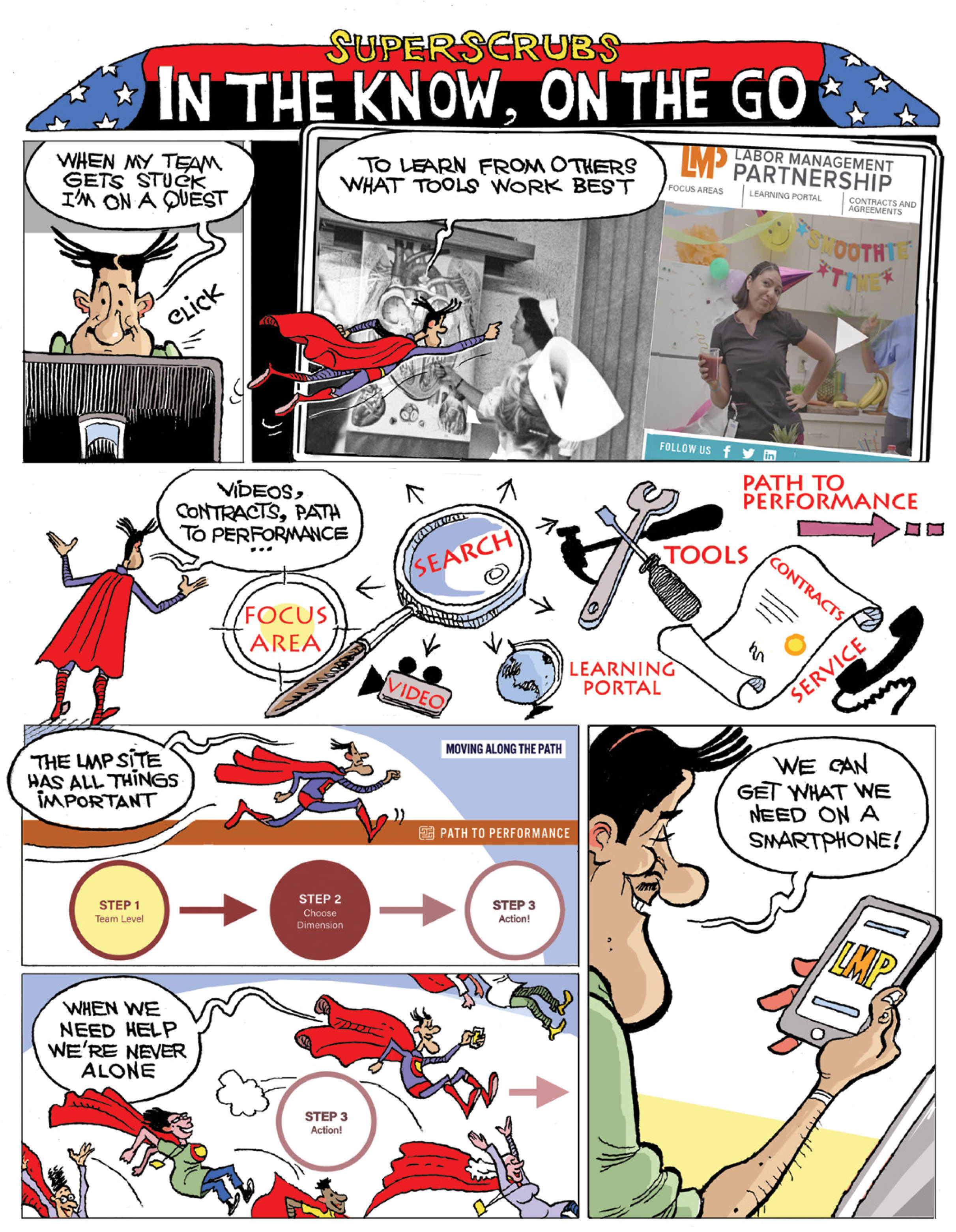
This issue of Hank magazine is a whirlwind tour of the Labor Management Partnership website, a one-stop shop for everything you need to turbocharge your team’s performance. Tip sheets, videos and inspiration are always just a few clicks away. If you can’t find what you want easily, just use our vastly improved search function. As one of our biggest fans put it, “Boom — there it is!”

On LMPartnership.org, you will:

  • learn from other teams — what worked, what didn’t, what sorts of roadblocks to expect and how to overcome them
  • download icebreakers to build trust and help quieter team members gain the confidence to speak up
  • meet the Humans of Partnership, a gallery of short, personal profiles that will make you proud to #BeKP

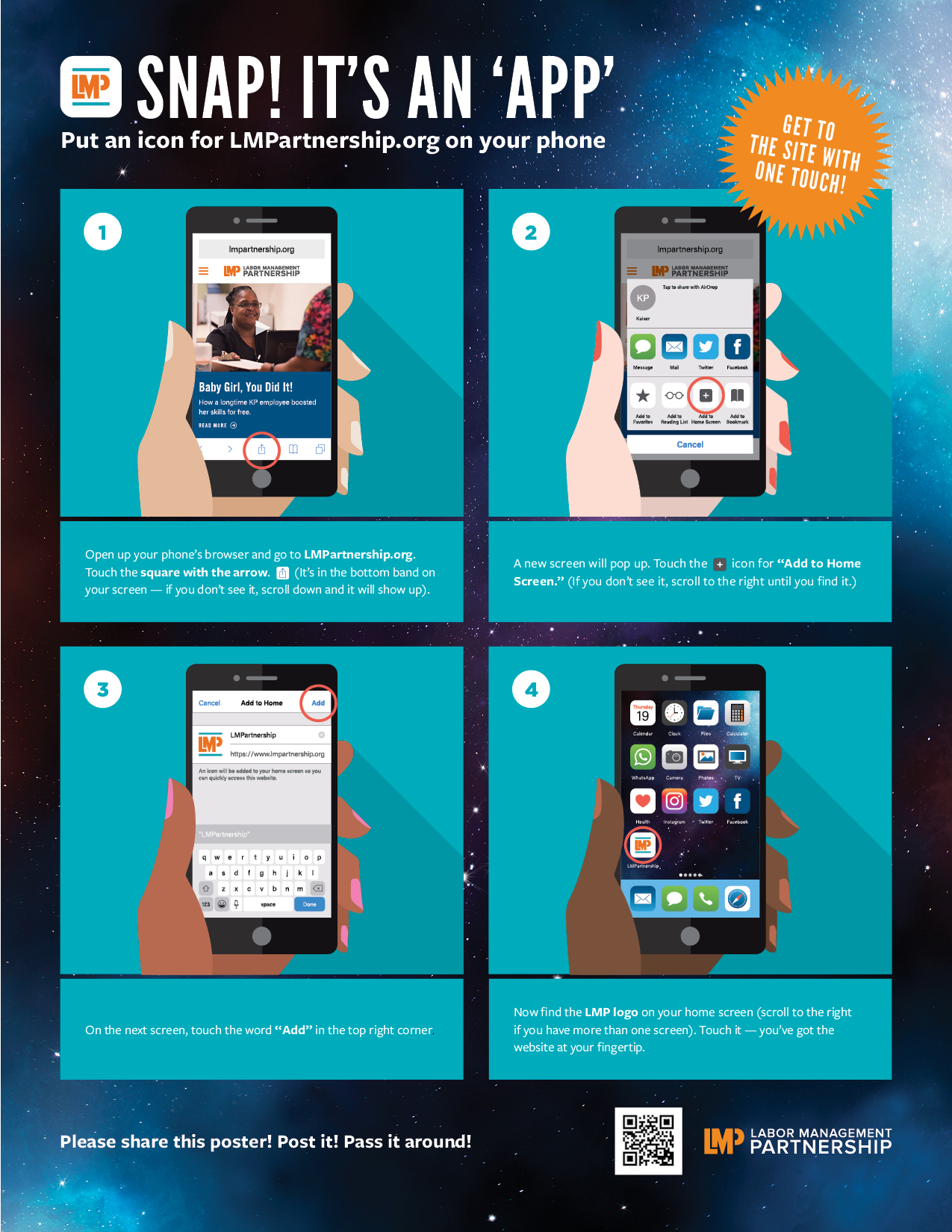
If you don’t sit at a computer as part of your day-to-day work, it’s easy to access LMPartnership.org on the go. Follow these instructions so we’re always at your fingertips on your smartphone. You’ll find yourself in a UBT meeting and calling up just the tool you need to help a team through a sticky situation.

You can even share resources from your phone with others who may not be as smartphone savvy. Pretty much every page has buttons that make it easy to email it to a colleague or share it on Facebook or Twitter.

Here’s another handy tip: even if you don’t visit LMPartnership.org (though I hope you do), reading this issue of Hank will help you learn how and why we do the vital work we do. So read on, log on and enjoy.


TOOLS

Poster: Snap! It's an 'App'

Format:
PDF (color and black and white)

Size:
8.5" x 11"

Intended audience:
Frontline employees, managers and physicians

Best used:
This poster demonstrates how to put an icon for LMPartnership.org on your smartphone. Share this with your teams and post it in breakrooms and on bulletin boards.

Related tools:

Tips for Keeping Patients Safe

Deck: 
How to make KP the safest place to get and to give care

Story body part 1: 

Health care workers’ first obligation is “do no harm”— to see that the members and patients in our care suffer no injury or further illness. Unit-based teams across Kaiser Permanente launch hundreds of projects every year to improve patient safety. These tips can your guide your team in a patient safety improvement project and help ensure that KP is the safest place to get and to give care.

  1. Wash your hands often, and in accordance with local policies and procedures.
  2. Speak up if you observe a drift from safe practice. As the saying goes, “If you see something, say something!”
  3. Make sure patients (or family members) understand their diagnosis and plan of care. Have them describe, in their own words, their condition, what they need to do next and why that’s important.
  4. Label specimens accurately, completely and legibly.
  5. When administering high-alert medications have two people separately check specific steps of the process. For example, a pharmacist calculates dosage, prepares a syringe and compares the product to the order; then a nurse independently does the same and compares the results.
  6. Use tools such as SBAR (Situation, Background, Assessment, Recommendation) and clear language like “Safety Check” to identify a hazard, if someone is uncertain and does not feel it’s safe for the patient to proceed. 
  7. Keep yourself free from injury so you can keep your patients free from harm.


Tips for Reducing Wait Times

Deck: 
Show our members you value their time

Story body part 1: 

Who hasn’t experienced the frustration of a long wait to get a prescription filled or a lab test done, or to see a physician who’s running behind schedule? To help keep Kaiser Permanente patients and members happy, many unit-based teams are tackling this issue and finding ways to reduce wait times.

  1. Raise awareness of the problem by sharing data about the department’s wait times and patient satisfaction scores with unit-based team members.
  2. Help your co-workers understand it is everyone’s responsibility to be attentive to members who have been waiting for long periods of time — and recognize co-workers who do this well.
  3. Inform patients of delays by having the receptionist let them know if a physician is running late.
  4. Provide members and patients who have been waiting for extended periods of time with individual attention and updated information by “rounding” in the waiting area.
  5. Put a focus on wait times by posting patient arrival times on exam room doors or having pharmacists call out the wait time in the pharmacy.
  6. Utilize an “all hands on deck” approach, so when wait times hit a certain threshold, all available staff members drop what they’re doing and help reduce long lines.
  7. Consider shifting employees’ schedules to ensure adequate staffing during peak hours and at the start of the day, so you don't fall behind from the beginning.*
  8. Promote alternatives to in-person visits such as prescription refills by mail or email, phone or video consultations with doctors.
  9. Rethink who does what if part of the reason for long wait times is that only employees in particular job category are allowed to do a certain task.*
  10. Create a quiet zone in pharmacies to reduce distractions for the primary filling technician.

*  Consult with local unions to ensure proposed changes are in line with the contracts.


Tips for Improving Health Screenings

Deck: 
Identifying health risks is essential to Kaiser Permanente's mission

Story body part 1: 

Screenings for such diseases as colorectal and breast cancers, high blood pressure, diabetes and obesity help us proactively identify identifying health risks and early signs of disease Here are some ways everyone can help ensure our members stay as healthy as possible.

  1. During a visit, print out and review with the patient any screening gaps that are identified on his or her Proactive Office Visit summary.
  2. Use KP HealthConnect™ and/or panel management tools to identify and reach out to members who are due for a screening to check for high blood pressure or such diseases as colorectal or breast cancer.
  3. Have receptionists keep an eye out for age- and risk-appropriate members during office visits and target them for follow up by care providers.
  4. Create outreach scripting that personalizes the importance of preventive screenings.
  5. Designate a staff member to contact members who received at-home fecal immunochemical tests (known as FIT kits), to remind them to return them.
  6. Capture patients’ attention by posting or mailing brightly colored literature that explains how a test detects early signs of disease and can be life-saving.
  7. Work with your local radiology department to identify the best days and times for same-day mammograms, so patients can get the scan without an appointment.
  8. Contact hypertensive patients at pharmacy pick-up counters for blood pressure checks and consultations.
  9. Have clinical assistants and/or medical assistants increase the number of outreach calls and blood pressure checks.
  10. Invite a regional or local expert in prevention and screening to meet with your team to discuss how best to support regional and local initiatives without duplicating efforts.


Pages

Subscribe to RSS - Frontline Physicians